Ship software.
Don't babysit it.

Coding agents no longer need a human watching every keystroke. The job now is running ten of them at once. Darting gives every agent its own cloud computer and owns everything around the code: branches, merges, CI, verification, deploy.

app.darting.dev
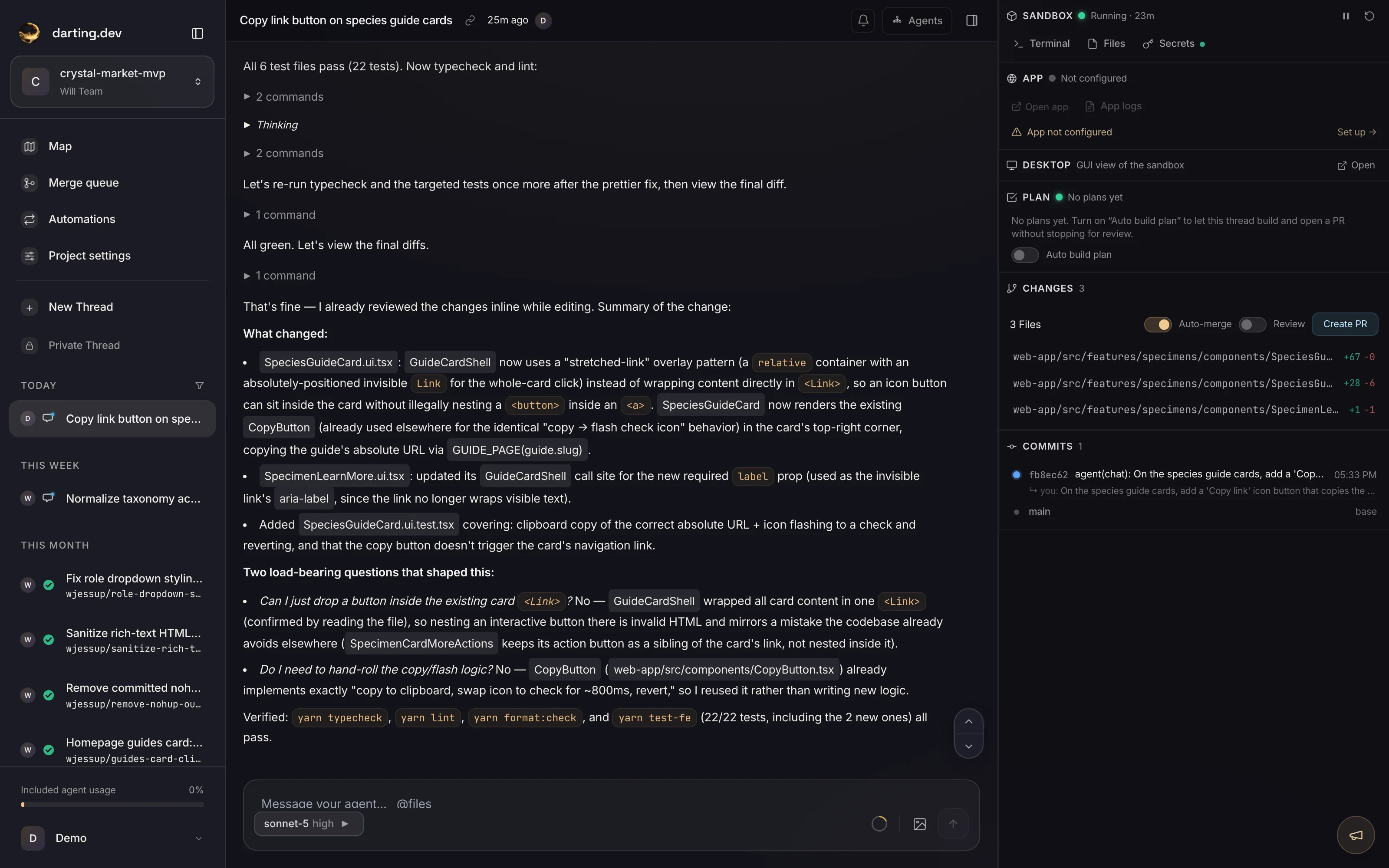
A darting.dev thread mid-run: streaming agent work, plan card, and a sandbox with changes ready to become a pull request

One word between “done” and “deployed”.

The agent finishes, proves it with a screenshot, and waits for you. Say “ship it” — then watch the right rail carry it home: PR opened, CI green, merged, live at your-app.darting.app. No pipeline to configure — see what Darting hosts.

app.darting.dev
A darting.dev thread shipping a feature: PR opened, CI checks green, merged, and deployed live

Approval to production, end to end — no terminal, no deploy scripts, no waiting on a release day.

We switched from Cursor to Darting to build Darting.

Weekly commits to the Darting codebase. The sharp rise after July 1 is the week we made the switch — same team, same project, 5x the shipping velocity.

Weekly commit chart for the Darting repository, February through September: low activity until a sharp, sustained rise after July 1 — the week the team switched from Cursor to Darting
Weekly commits · July 1: switched from Cursor to Darting

Speed isn't typing code faster. It's everything around the code.

Cursor accelerates the editing. Darting automates the rest — the sandboxes, the merges, the CI, the deploys, the context — so the time between idea and production collapses.

Cloud first

Send prompts from the web or your phone. No app to download, no laptop to keep open — agents keep working after you close the lid.

Sandbox state, managed

Sandboxes stay up to date with the latest code and secrets automatically, and merge conflicts get resolved with full context — not clobbered.

Deployment, automated

Darting observes your existing CI pipeline, fixes red checks, and tracks every deployment to production — no babysitting the pipeline.

Knowledge that compounds

Builds a knowledge base of your project and keeps it current, so agents move faster and get the right answers the first time.

Maximally inspectable

For power users, nothing is hidden. View and modify system prompts, debug transcripts, and see exactly what context each agent gets.

Multiplayer

Bring your team. Threads are shared — anyone can steer an agent, review a plan, or pick up where a teammate left off.

Your day, before and after.

The code generation is comparable. The week around it is not.

  • Laptop open, editor running — you drive every step
  • You keep branches current and untangle merge conflicts
  • CI goes red, you stop and triage
  • Deploys are your problem after the PR
  • Context lives in your head — every session starts cold
  • Prompt from web or phone — agents keep working when you close the lid
  • Sandboxes stay current with the latest code and secrets, conflicts resolved with context
  • Red checks get read and fixed automatically
  • Deploys to production, observed and tracked
  • A living knowledge base every agent starts from

Point it at a repo. The workspace is ready.

Every agent gets its own cloud VM with a live copy of your app. Paste a git URL and Darting clones it, installs dependencies, boots the dev server, and saves a warm snapshot — nothing on your machine.

app.darting.dev
A darting.dev sandbox booting: repo cloned, dependencies installed, dev server running, snapshot saved

A real setup run — cloned, installed, booted, and snapshotted in the cloud.

The details stay within reach

Darting handles the delivery flow end to end while preserving the control points that matter to your team.

  1. 01

    Create a project

    A project is your workspace — usually backed by a git repo, or start empty and connect one later.

    • Git URL — paste any HTTPS or SSH repo; private repos authenticate via GitHub
    • Start fresh — create a project without a repo and connect GitHub when you're ready
    • Empty repo — create a private GitHub repo for you so there's always a PR target
  2. 02

    Describe the outcome

    One interactive lead agent per thread. It self-assesses complexity and chooses how to proceed.

    • Trivial asks — implements directly
    • Moderate work — sketches a brief approach, then builds
    • Complex work — writes a living plan document; you review and click Build
  3. 03

    The swarm works in isolation

    Each thread runs in its own cloud sandbox, branched from main, so parallel work never collides. Within a thread, the lead agent delegates to sub-agents that share it.

    • One thread's edits can never break another thread's test run
    • Compute-heavy builds and tests run off your machine
    • Agents validate the UI like a human and record a video of the fix
  4. 04

    Review, integrate, and deploy

    Inspect the working software and its proof, then ship an approved result to production on your terms.

    • Branch-aware diffs, an SVG branch graph, and a video summary
    • Open a PR with a drafted title and body
    • Failing CI gets read and fixed automatically; arm auto-merge when you're ready
    • When a teammate merges to main, each thread sees it and updates in a click
    • Your approved result deploys to a live URL

Most AI tools stop at a pull request. That is where the real work starts. Darting ships the software.

Ship serious code on the go.

Everything runs in the cloud, so your phone is a full seat at the table. Review the plan from the train, watch the proof video over coffee, and say “ship it” from wherever you are — the build, tests, and deploy never touch your machine.

No laptop, no terminal, no VPN. Just the conversation — and production at the other end of it.

9:41
Checkout bug fix

Customers are getting charged twice on checkout — can you find and fix it?

fable-5.1 · highMayanow

Knowledge that compounds across every request

A background agent turns your architecture, data model, conventions, and security model into a shared company brain. Every agent starts grounded in that context, and it stays current as the code changes.

app.darting.dev
The knowledgebase graph: a force-directed map of every knowledge, rules, and plans document clustered into topics and areas, colored by collection

The live knowledge graph — every document your agents share, clustered by area and kept current.

The rest of the toolkit.

Living plans, isolated sandboxes, video proof, standing automations — the pieces that keep twenty agents productive without twenty tabs of babysitting.

Plans that stay current

Every agent works from a living plan. Revisions are tracked, scope changes surface for your approval, and nothing drifts silently.

Sandboxes that never collide

Every thread works in its own isolated cloud sandbox on its own branch, so one thread's edits can never break another's test run. Parallel work never trips over itself — no phantom failures, no wasted time or spend.

Git-native, always in sync

PRs open and stay current automatically. When a teammate merges to main, every thread sees how far behind it is and updates in a click — so work never drifts out of date.

Fixes you can watch

Agents drive the real UI like a person — reproduce the bug, confirm the fix actually works, then send a video summary. Review the proof and merge in minutes, not hours.

Agents that do, not just code

Sandboxes aren't only for code. Standing automations run research, publish articles, answer support tickets, and more — on a schedule or a trigger.

A whole team, in parallel

Run many agents at once — a planner explores while a coder builds and a tester verifies. No one blocks anyone else.

Pay for what you use.

No plans to pick and no monthly bills. darting works on prepaid credits — agent model calls and sandbox compute are metered in dollars at provider list price with no markup, and drawn down from your balance. When it hits zero, agents pause until you top up.

New accounts start with $10 in free credits and three project setups, each comped up to $10 — every feature is included.

New-account credit$10 freeMinimum top-up$5Purchase fee0%Credits expireNever
  1. 01

    Load credits

    Start with $10 free, then top up from a $5 minimum. Credits never expire — load a balance and spend it on real work.

  2. 02

    Work draws at cost

    Model tokens bill at the provider's list price with no markup. Sandbox compute is about $0.66/hr; idle does not accrue.

  3. 03

    Agents pause at $0

    There's no overage bill. When the balance hits zero, agents pause until you add credits. Auto-refill is optional.

A prepaid balance

Buy credits via Stripe Checkout — $5 minimum, up to $5,000. They never expire. Agent model work and sandbox compute draw down your balance in real time, so what you load is exactly what you spend.

Metered at cost

Models bill at their provider's list price — the same per-token rate you'd pay Anthropic, OpenAI, or the maker directly — with no markup. Sandbox compute is pass-through too (about $0.66/hr for an 8-vCPU, 16 GiB sandbox).

A hard stop at $0

There's no monthly plan and no overage bill. When your balance hits zero, agents pause until you add credits — you can't spend past what you've loaded.

Auto-refill, optional

Set a threshold and a top-up amount; when your balance dips below it, a saved card is charged automatically. Off by default, and it disables itself after a few failed charges so you're never silently charged twice.

Questions, answered

How do credits work?

Credits are prepaid and never expire. Buy them via Stripe Checkout — $5 minimum, up to $5,000 — with a 0% purchase fee, so you add exactly the credits you pay for. Model tokens plus sandbox compute draw down your balance in real time at the same at-cost rates. What you load is exactly what you spend.

I already pay for Claude Max. Can Darting use that?

No — and you come out ahead. Darting runs a dozen agents at once in cloud sandboxes, which no personal subscription is built for. Instead you get every frontier model at list price with 0% markup, Auto routing each step to the one that fits, and the machinery a terminal can't give you: a sandbox and branch per task, verification in a real browser, agents that fix their own CI and hand you a merged PR. You'd pay for tokens either way. Here they come with the rest of the job done.

What you get instead
What happens when my balance hits zero?

Agents pause until you add credits. Nothing keeps running, so you're never billed past what you've loaded. Turn on auto-refill and a saved card tops the balance up for you automatically.

How does auto-refill work?

Set a threshold and a top-up amount. When your balance drops below the threshold, the card on file is charged that amount. It's off by default and disables itself after a few failed charges, so a declined card never becomes a surprise double charge.

How am I metered for model work?

At the provider's list price with no markup — the same per-token rates you'd pay Anthropic, OpenAI, or the maker directly. The app's model selector and usage tab show live per-model pricing, and your drain is visible on your credit balance.

Do I pay for sandbox compute separately?

No separate bill. Each thread runs in its own isolated cloud sandbox, metered at cost — about $0.66/hr for an 8-vCPU, 16 GiB sandbox — and drawn from the same credit balance as model work. Idle sandboxes don't accrue.

Can I set spending limits?

Yes. Set optional hourly and/or daily caps; while a cap's window is active, agents throttle to keep you under it. Caps are self-imposed and lift once the window expires.

Is my code private, and where do agents run?

Yes. Each thread runs in its own isolated cloud sandbox, branched from your repo, and torn down after use. Private repos authenticate with a token you control. Heavy builds and test suites never touch your laptop.

We’ve shipped software the hard way.

Darting is built by a team with 20 years of large-scale development experience — major infrastructure projects for startups and Fortune 100 customers, alongside development teams of 50+ people. We know what it takes for a team to ship, because we’ve spent our careers doing it.

ClaudeGrokGPT-5.6GitHubE2BPlaywrightPostgres

Describe the software. Get the live site.

Start with a conversation. Darting handles the build, proof, integration, and deployment — while keeping every detail there when you want it.